What is a Queue Management System?
A queue management system (QMS) is technology that organizes and tracks customer flow through your service locations. It captures every customer interaction from check-in to departure, giving operations leaders real-time visibility into wait times, service efficiency, and operational performance.
In practical terms, a QMS tells you who is waiting, how long they have waited, which service they need, and what happened during their visit. Without one, you operate on guesswork.
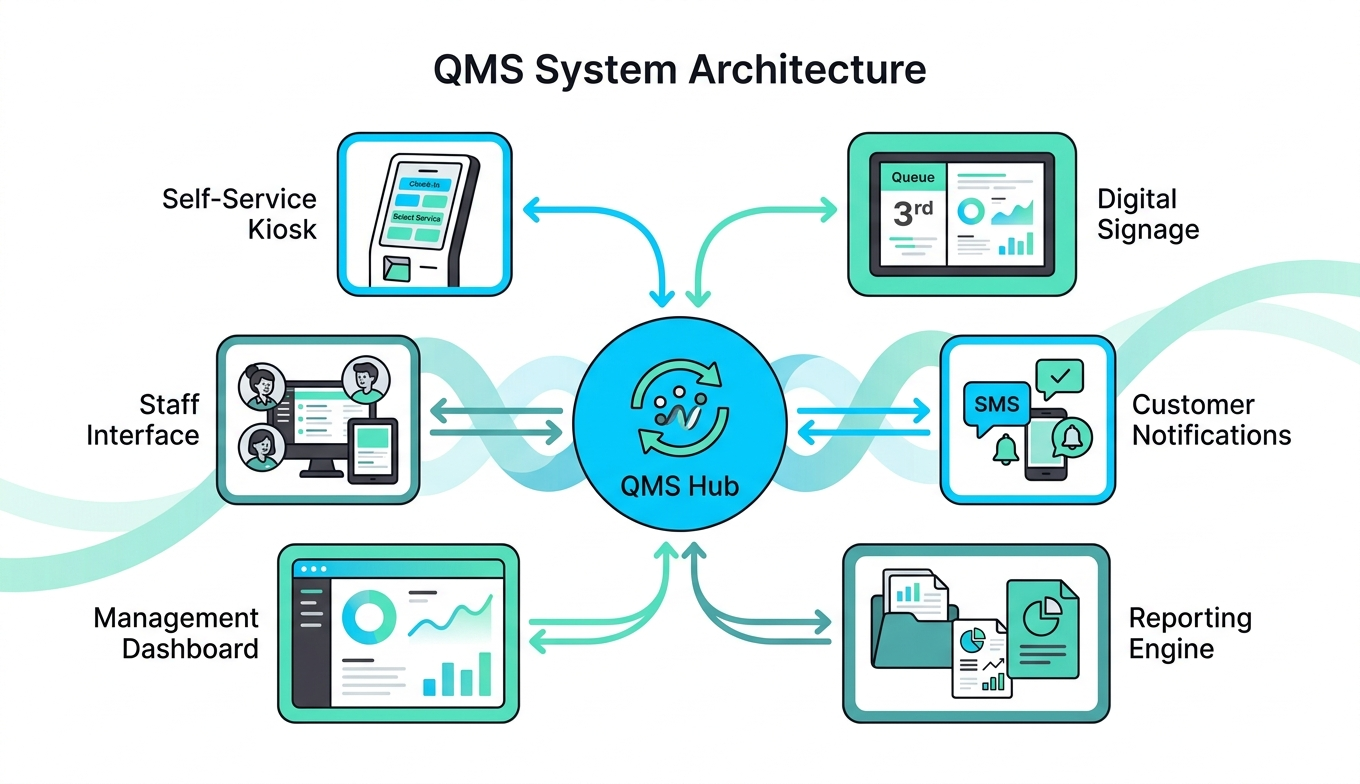
A complete QMS combines three elements: self-service hardware (kiosks, digital signs), staff-facing software (interfaces, dashboards), and data systems (reporting, analytics). Together, these capture operational data automatically and surface it instantly to managers and leadership. As a result, organizations acquire the data that helps them optimize their queue management efforts, with measurable improvements in wait times, customer satisfaction, and staffing efficiency. The customers who cost you most are not the ones who complain about the wait. They are the ones who leave before they are called, and never appear in your data at all.
What Happens Without a Queue Management System
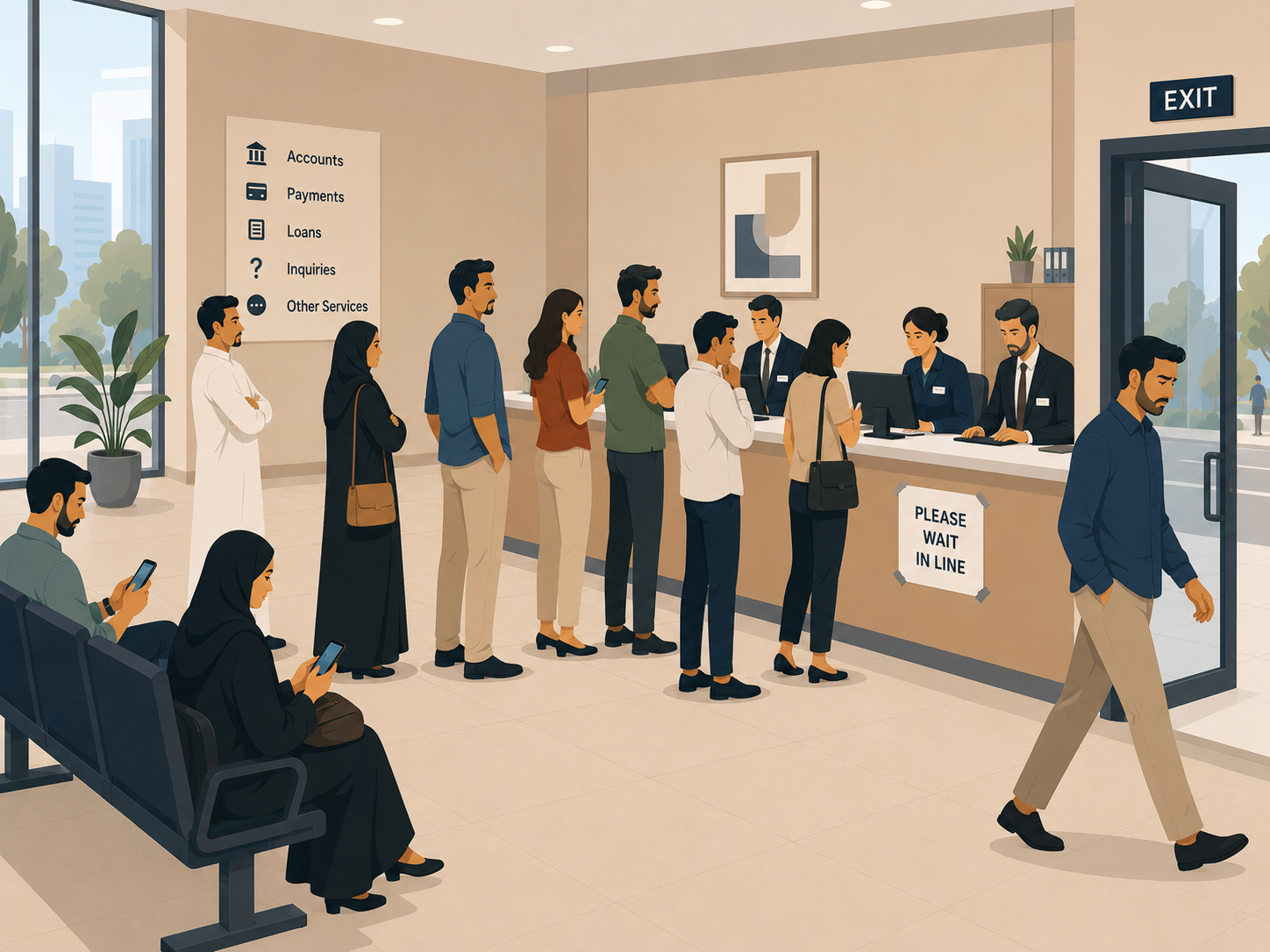
Picture a typical Monday morning at one of your branches. Customers arrive without clear direction. Some check in at a desk, while others stand near counters, uncertain who is next. Staff call names from memory or handwritten notes. When customers ask “How much longer?”, staff answer with a guess.
As a result, some customers leave without being served. Because no system captures walkouts, no one records this loss, or how it could’ve been prevented.
By day’s end, your branch manager reports “it was busy,” but cannot answer your questions. How many customers actually came? How long did the average person wait? Which service types took longest? Did you lose revenue from walkouts?
Consequently, staffing decisions happen on intuition rather than data. You approve budgets without knowing if additional staff actually improved performance. Meanwhile, leadership wants proof of operational improvement, but you have only anecdotes.
This absence of information is exactly what a queue management system eliminates. Without one, you cannot run operations strategically. You can only respond to complaints.
How a Queue Management System Works: 5 Steps
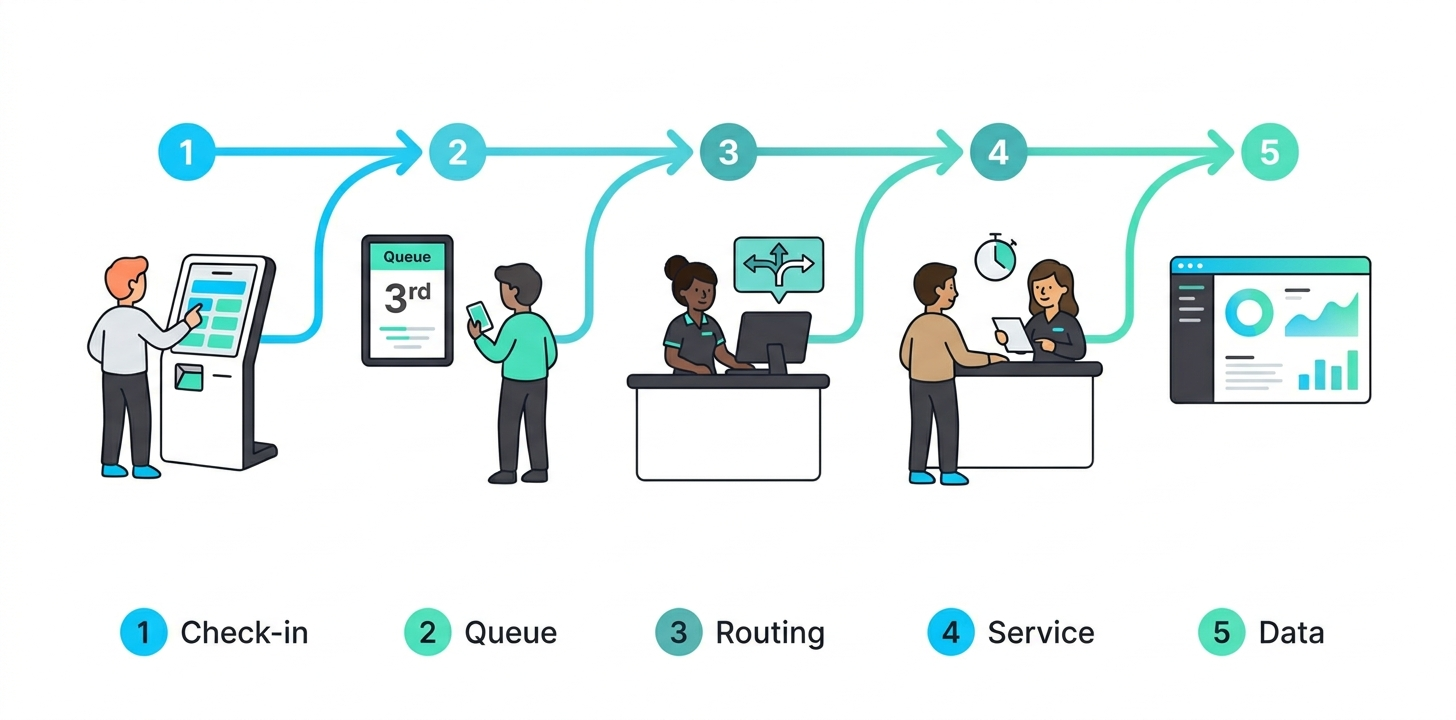
A QMS operates through a straightforward process. A customer arrives, checks in, waits, moves through service, and departs. At each step, the system captures data and makes it available to staff and leadership in real time.
The 5-Step Flow
- Customer arrives and checks in. The customer uses a self-service kiosk to select their service type, or staff assist them through a receptionist interface. Because the system records their arrival time and service category instantly, no interaction goes untracked. Whether customers use a kiosk, mobile app, SMS, QR code, or traditional check-in, a timer begins the moment they enter.
- System assigns queue position. Next, the QMS assigns the customer a position in line. Digital displays in the waiting area show their position and estimated wait time. For locations using virtual queuing, customers receive real-time SMS or app notifications like “Your turn is in 12 minutes.” As a result, customers no longer stand idle, they can wait elsewhere and return when their turn approaches.
- System routes to the right service point. When a counter becomes free, the QMS determines which customer is next based on service type and priority. For example, if you run three counters for account openings and two for complaints, the system routes each customer correctly. Furthermore, when service requirements change mid-visit, customers can be transferred without losing their place in line.
- Customer is served and data is captured. A staff member calls the next customer and opens their interface. The clock starts for service time. When service ends, the staff member closes the transaction. In doing so, the system automatically logs which staff member served them, which counter was used, how long the service took, and whether any issues occurred.
- Data becomes immediately available. The moment service ends, dashboards update in real time. Your operations dashboard therefore shows total customers served, average wait time, which counters are busy or idle, and whether customers walked out. Branch managers see this instantly, while leadership receives rolled-up reports across all locations.
Key Components of a Queue Management System
A complete QMS includes six essential components that work together to capture and surface operational data. Each serves a specific function in the customer journey or data pipeline.
| Component | Function |
|---|---|
| Self-service kiosk | Touchscreen where customers check in and select their service type. Receives a ticket number or virtual position. Integrates with your branding and supports multiple languages. |
| Digital signage | Wall displays in the waiting area show live queue status, which counter is serving next, estimated wait times, and service announcements. Updates in real time as the queue moves. |
| Staff interface | Desktop or tablet app used by counter staff to call the next customer, handle transfers, mark service as complete, and record notes. Shows service type and any special customer flags. |
| Customer notifications | SMS, WhatsApp, or app alerts notify customers when their turn approaches. Reduces physical waiting time and keeps customers informed even if they step away. |
| Management dashboard | Web portal showing real-time queue status, wait metrics, staff performance, and bottlenecks across all branches. Accessible from any device, anywhere. |
| Reporting engine | Generates daily, weekly, and monthly reports on wait times, throughput, walkouts, peak hours, staff efficiency, and service quality. Exportable for board presentations. |
Who Benefits From a Queue Management System
Operations Directors
The operations director (we call this person “Firas”) gets what matters most: visibility. Cross-branch performance becomes visible at a glance, making it easier to compare locations, identify staffing problems, and make decisions backed by data. Because wait times, walkouts, and satisfaction scores are all tracked, proving operational improvement to leadership is no longer a matter of opinion. The QMS, as a result, turns a gut-feel operation into a measured one.
Branch Managers
Branch managers run the floor daily. A QMS gives them real-time control, which means they can see queue depth, identify bottlenecks, and call in extra staff during peaks before the situation worsens. Furthermore, they can hold customers who might otherwise leave. At shift end, they have data explaining exactly what happened, so defending staffing decisions becomes straightforward instead of subjective.
Executives and Board Leadership
Board-level executives need simple metrics: Are we improving? What is our baseline? A QMS provides summary dashboards, year-over-year comparisons, and KPI reports to answer those questions directly. More importantly, it provides auditability — they can see exactly what happened at any location on any day. Consequently, operational improvements are real and measurable, not anecdotal.
Customers
Customers experience the benefits directly. A clear check-in process removes uncertainty, while fair service order (no cutting in) builds trust. Reduced wait times improve satisfaction, and virtual queuing options let customers wait elsewhere rather than standing in line. For example, a customer who knows they are 4th in line with a 10-minute wait feels far less frustrated than someone standing in a crowd with no information. This translates to higher satisfaction scores and fewer complaints.
Key Takeaways
- A QMS organizes customer flow and captures operational data automatically, eliminating guesswork from your operations.
- The system combines kiosks, digital displays, staff interfaces, customer notifications, dashboards, and reporting tools.
- Real-time data on wait times, service duration, and walkouts lets branch managers and leadership make data-driven decisions.
- Operations directors see cross-branch visibility, allowing them to identify and fix bottlenecks quickly.
- Customers experience clearer processes, fair service order, shorter perceived wait times, and optional virtual queuing.
- Implementations typically show 40% reduction in average wait time and 70% reduction in customer walkouts.
See how Waqtak’s Queue Management works
Structured queues, real-time data, and full visibility across every branch.
A ticketing system issues a number and nothing else. A queue management system does that and more — it tracks every customer from check-in to departure, routes them to the right service point, sends real-time notifications, and generates performance data for management. A ticketing system tells customers to wait. A queue management system tells operations leaders what is actually happening.
Yes. A multi-branch queue management system gives operations leaders a single dashboard showing real-time performance across every location simultaneously. Managers can compare wait times, walkout rates, and staff efficiency between branches, and identify problems before they escalate. Waqtak is built specifically for multi-branch service organizations.
A queue management system typically requires self-service kiosks for customer check-in, digital display screens for the waiting area, and counter terminals for staff. Some systems also support mobile check-in via QR code or SMS, reducing hardware dependency. Hardware is installed on-site at each service location and connects to the cloud-based platform.
Implementation time depends on the number of branches and the complexity of your service workflows. A single-branch deployment can go live within days. Multi-branch rollouts are phased by location. Waqtak handles the full deployment process — hardware installation, system configuration, and staff training — so operations are not disrupted during the transition.
A queue management system tracks average wait time, service duration, number of customers served, walkout rate, peak hours, counter utilization, and staff performance. These metrics are available in real time on management dashboards and in scheduled reports for leadership. Over time, this data allows organizations to make staffing, layout, and workflow decisions based on evidence rather than observation.
Queue management systems are used in any industry where customers physically arrive for service. Common deployments include government service centers, banks and exchange houses, hospitals and clinics, telecom stores, NGOs, and retail operations. The core requirement is the same across all of them: multiple customers arriving at unpredictable times, needing to be served in a fair, efficient, and trackable order.
Waqtak is a cloud-based queue management system built for multi-branch service organizations.
What Your Operation Loses Without a Queue Management System
Right now, someone is walking into one of your branches. They will look around, figure out where to…

How to Choose the Right Queue Management System
Most organizations approach this decision the wrong way. Features get evaluated before requirements are understood. Price gets compared…

The Benefits of a Queue Management System
A queue management system does two things at once: it organizes your customer flow and generates the data…
Want to see how this works in practice?
Book a personalized demo and we will walk you through how Waqtak closes these blind spots for an operation like yours.
Book a Demo